
Raspberry Pi Starter Kit

- Kit Contents:
- Raspberry Pi 2
- 8GB MicroSD card pre-loaded with NOOBS
- 2A Power Supply
- Enclosure
- 1m HDMI Cable
Mini Wireless Keyboard & Mouse

This compact wireless keyboard is perfect for group learning. Comes with a rechargeable Li-ion battery which chargers via USB.
I Want This KeyboardSense HAT with Orientation, Pressure, Humidity and Temperature Sensors

The Sense HAT is attached on top of the Raspberry Pi via the 40 GPIO pins. The Sense HAT has several integrated circuit based sensors that can be used for many different types of experiments, applications, and even games.
Give Me a Sense HAT
Pi-View

Do you have old computer monitors? The Pi-View is a convenient, compact HDMI to VGA conversion cable.
I Need the Pi-View7” Touchscreen Display
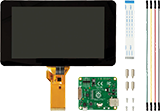
Turn your Raspberry Pi into a touch screen tablet, infotainment system, or standalone device, including a 10 finger capacitive touch.
- Screen Dimensions: 194mm x 110mm x 20mm
- Viewable screen size: 155mm x 86mm
- Screen Resolution 800 x 480 pixels
What is a Raspberry Pi?
The Raspberry Pi is a low cost, credit-card sized computer that plugs into a monitor or TV, and uses a standard keyboard and mouse. It is a capable device that enables people of all ages to explore computing, and learn how to program in languages like Scratch and Python. The Raspberry Pi is also capable of doing everything you expect a desktop computer to do, from browsing the internet and playing high-definition video, to creating spreadsheets, word-processing, and gaming. With its easy-to-use interface, portability and versatility, this tiny but mighty computer is the perfect learning tool for any classroom.
Read how to get started with Pi and learn from real life Raspberry Pi projects and discussions on the element14 Community.

Learn How To Code!
The Raspberry Pi is the perfect tool to teach computer programming in a fun, interactive environment. Whether you are a beginner starting with variables, loops and functions, or looking for more advanced projects like 3D graphic programming, building games, networking, scripting, and interfacing with hardware or opening up the world of Minecraft, the affordable Raspberry Pi is a great tool.

Scratch is a visual programming tool which allows the user to create animations and games with a drag-and-drop interface. Create your own computer games, interactive stories, and animations using some programming techniques without actually having to write any code.
Python is a widely used, general-purpose programming language. Favoured by many users around the world due to its simple and clean appearance, it’s a great way to learn and engage in coding regardless of your experience.
Click here for more information on how to get started with coding on the Raspberry Pi.
With the power of Python, you can build your very own game from the ground up or open an existing Minecraft game and make it your own by simply changing a few bits of code!
The lesson plans from the Raspberry Pi Foundation provide simple and easy-to-follow instructions of how to construct various games and what you will need.
Classroom Projects!
The Raspberry Pi Foundation, a charity founded in 2009 to promote the study of basic computer science in school, provides free resources to teach, learn and make with the Raspberry Pi.
Visit our Raspberry Pi & Accessories page to purchase the products needed for these projects.


Sorting Hat Lesson
Which house in Hogwarts do you belong in? Create your very own sorting hat program!
Learn More

Parent Detector
Use the Raspberry Pi Camera Module and see who’s been sneaking around your room.
Learn More
Quick Reaction Game
Got cat-like reflexes? Learn to code in Python and build your own circuit for this great game!
Learn More

‘Whac-A-Block’ Minecraft Pi Game
Interact with Minecraft with Python and learn how to use random modules and loop statements.
Learn More

Temperature Log
Automatically measure and log the operating temperature of your Raspberry Pi by creating a shell script.
Learn More
element14 20% Education Discount*
Take advantage of our Education Discount by registering for an account today and receive 20% OFF on element14 products, including the Raspberry Pi accessories. Flexible payment options are also available; including 30 day payment terms and pay-as-you-go by credit card.
Register for an Education Account
*The Raspberry Pi Foundation is a charity and has set the RRP on Raspberry Pi boards. Boards cannot be discounted below the advertised price. Please contact our Customer Service team on 1300 361 005 with any queries.